
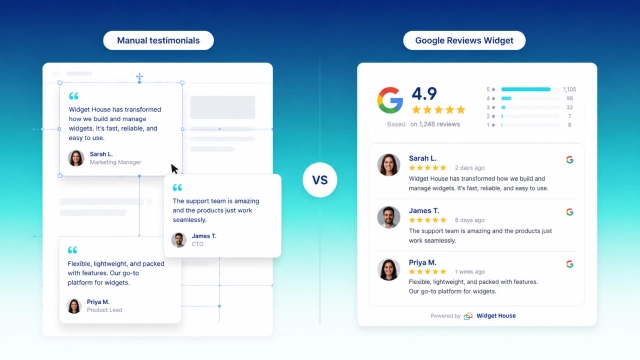
Customer reviews can be one of the strongest trust signals on a website. But there is more than one way to show them.
Some businesses manually select customer testimonials and add them to their pages. Others connect a Google Reviews Widget that displays feedback from their Google Business Profile. And many websites use a combination of both.
At first glance, these approaches may seem interchangeable. After all, both show visitors that other people have already used your product or service and had something to say about it.
But they work very differently.
Manual testimonials give you more control over the story you tell. A Google Reviews Widget gives visitors access to feedback coming from a recognizable third-party platform and can significantly reduce the amount of manual work needed to keep reviews up to date.
So which approach is better?
In this guide, we'll compare Google Reviews widgets and manually added testimonials across trust, authenticity, maintenance, design flexibility, scalability, SEO, and different business use cases.
What Is a Manual Testimonial?
A manual testimonial is customer feedback that a business collects and adds to its website itself.
For example, a customer may email you after a successful project, leave feedback after a purchase, or agree to provide a short quote about their experience. You can then add that testimonial to your homepage, landing page, pricing page, or another part of your website.
Because the testimonial is managed directly by the website owner, you decide which customer feedback appears, where it appears, how much of the testimonial is shown, what customer information is included, how the testimonial is designed, and when it is updated or removed.
That level of control is the biggest advantage of manual testimonials.
A B2B company, for example, may want to highlight a testimonial from a recognizable client alongside the customer's name, job title, company, logo, and specific business results.
Instead of:
"Great company. Highly recommended."
the business can publish something much more detailed:
"After implementing the new solution, our team reduced the time spent on manual reporting and improved response times across three departments."
For complex products and services, that additional context can be extremely persuasive.
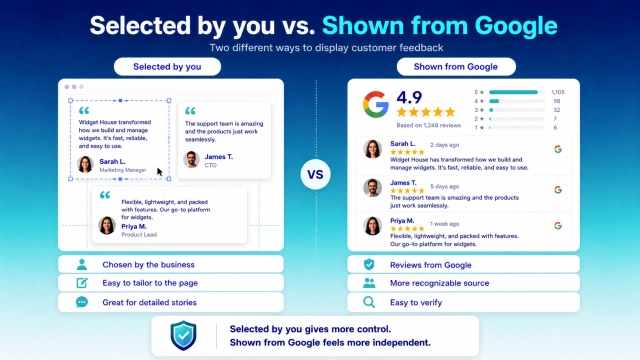
Advantages of Manual Testimonials
The biggest advantages are control and storytelling.
You can choose testimonials that match the exact product, service, or audience of a page. You can also organize testimonials around specific objections or benefits.
For example, a SaaS pricing page might highlight a testimonial about ease of implementation, while a feature page could show feedback specifically related to that feature.
Manual testimonials also offer almost unlimited design flexibility. They can be deeply integrated into the visual structure of a page without needing to follow the format of an external review platform.
They are especially useful when:
- the buying decision is complex;
- you sell B2B services;
- customers can provide detailed results;
- recognizable clients are willing to be featured;
- you want to build testimonials around specific use cases;
- you need complete control over layout and presentation.
Disadvantages of Manual Testimonials
The same control that makes manual testimonials useful can also make them less convincing to some visitors.
A website naturally selects which testimonials appear. Visitors know this.
If a page contains five perfect testimonials saying how amazing the business is, it may be difficult for a visitor to tell how representative those comments actually are.
There is also usually no independent platform attached to the testimonial.
Unless you provide enough information about the customer, a visitor may have no easy way to verify who wrote it or where the original feedback came from.
Manual testimonials also create ongoing maintenance work.
Someone needs to:
- collect new feedback;
- choose what to publish;
- prepare the text and assets;
- add it to the website;
- update older testimonials;
- repeat the process as new feedback appears.
As a result, testimonial sections can remain unchanged for months or even years.
What Is a Google Reviews Widget?
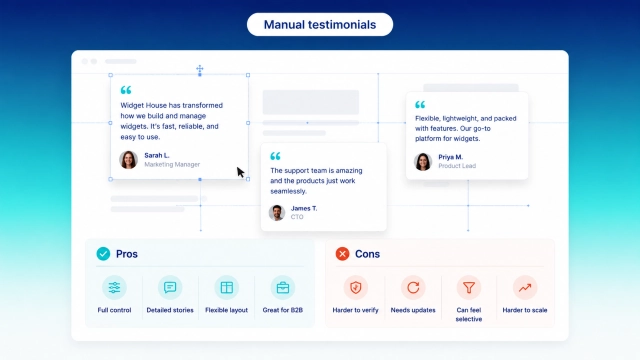
A Google Reviews Widget is a website component that displays reviews associated with your business on Google.
Instead of manually copying each review into your CMS, you connect a review source and display those reviews through a widget embedded on your website.
Depending on the design you choose, Google reviews can appear as a carousel, slider, grid, badge, or another layout that fits naturally into the page.
See a Google Reviews Widget in Action
Want to see how Google reviews could look on your own website? Use the Widget House builder below to choose a layout, connect your review source, and preview the widget before you publish it.
The main difference compared with manual testimonials is the source.
Visitors can immediately recognize that the reviews originate from Google rather than being written specifically for the company's website.
A typical review card may include information such as:
- star rating;
- review text;
- reviewer name;
- reviewer image where available;
- review date;
- Google branding.
With Widget House Google Reviews, the basic setup can be completed in four steps:
- Choose a template.
- Connect your review source.
- Customize the widget if you want to.
- Add the widget code to your website.
There is no need to manually recreate every review as a separate website element.
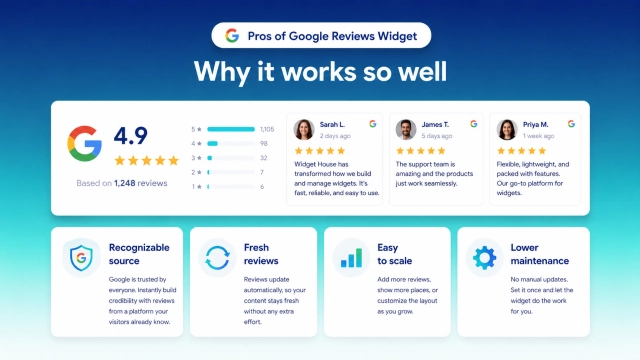
Google Reviews Widget vs. Manual Testimonials: Key Differences
The easiest way to understand the difference is to compare the two approaches directly.
| Feature | Google Reviews Widget | Manual Testimonials |
|---|---|---|
| Review source | Third-party platform | Collected and published by the business |
| Visitor recognition | High because Google is familiar | Depends on presentation |
| Ability to verify the source | Generally easier | Often limited |
| Content control | Moderate | Very high |
| Automatic updates | Possible | No |
| Design flexibility | High | Very high |
| Initial setup | Low | Medium |
| Ongoing maintenance | Low | Higher |
| Scalability | High | Limited by manual work |
| Detailed storytelling | Limited by original review | Excellent |
| Best suited for | Local businesses, services, ecommerce | B2B, SaaS, case-study-driven businesses |
The most important difference is not visual.
It is who controls the original feedback and where it comes from.
With manual testimonials, your business controls almost every part of the presentation.
With Google reviews, the original feedback exists on a platform outside your website.
That difference affects how visitors may perceive the reviews.
Which Builds More Trust?
Trust is the main reason businesses show customer feedback in the first place.
But not all forms of social proof create trust in exactly the same way.
Imagine two sections on otherwise identical websites.
The first says:
What Our Customers Say
and displays three carefully designed testimonials.
The second displays:
The second displays a recognizable Google rating together with real Google review cards.
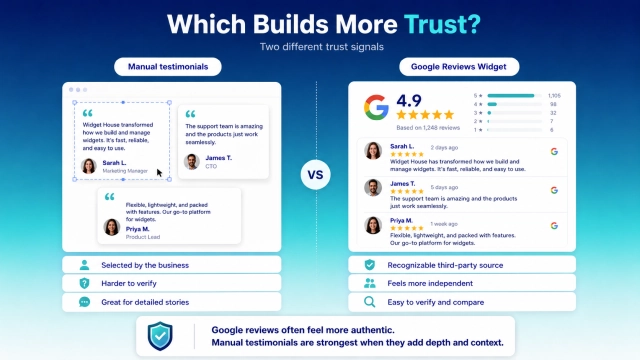
Both can be persuasive. But they communicate different things.
The manual testimonials say:
“These are the customer stories we have selected to show you.”
Google reviews say:
“These are reviews connected to our presence on an external platform.”
That distinction matters.
Why Google Reviews Can Feel More Authentic
Visitors already understand how Google reviews work.
They recognize the star rating system and the general appearance of Google review profiles. They may also be able to find the business on Google and explore additional feedback there.
Because the original reviews are not created specifically for your website, they can feel more independent.
That doesn't mean every Google review is automatically accurate or useful. It does mean that visitors understand that the business does not have complete control over the external review platform itself.
Google reviews can also include small imperfections that actually make the overall feedback feel more natural.
A business with a 4.8 rating and hundreds of varied reviews may look more credible than a website containing five anonymous five-star testimonials where every customer appears completely satisfied.
When Manual Testimonials Can Be More Persuasive
Manual testimonials still have one major advantage: depth.
A Google review might say:
"Great service, very easy to work with."
That is useful social proof, but it doesn't explain much.
A detailed testimonial can tell a full story:
- what problem the customer had;
- why they chose the business;
- how the product or service helped;
- what changed afterward;
- what specific result they achieved.
For businesses with longer sales cycles, these details can matter more than the star rating itself.
This is particularly valuable for:
- agencies;
- consultants;
- B2B software;
- professional services;
- complex products;
- high-value purchases.
If a prospective customer needs to understand how your solution works in the real world, a detailed manual testimonial or case study can provide information that a short Google review cannot.
Freshness: Automatic Reviews vs. Static Testimonials
One of the most overlooked differences between the two approaches is freshness.
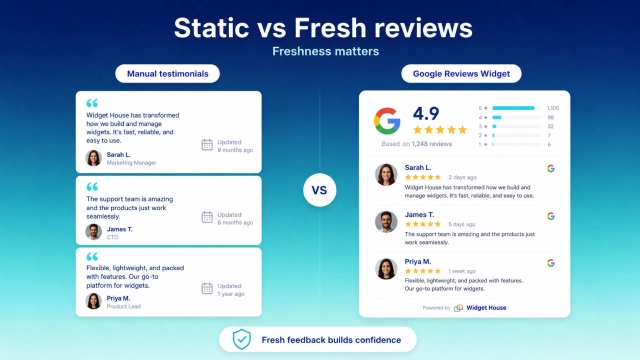
A testimonial section may look excellent when a website is launched.
But what happens a year later?
The same three quotes may still be there.
Nothing is technically wrong with them. But visitors may wonder:
Are these still representative of the business today?
Fresh customer feedback signals ongoing activity.
If a visitor can see reviews from recent customers, it reinforces the idea that people continue to use the business, purchase its products, and share their experiences.
A Google Reviews Widget makes this much easier to manage because the widget can reflect reviews from the connected source without requiring someone to rebuild the testimonial section manually every time new feedback appears.
With manual testimonials, maintaining that freshness requires an ongoing editorial process.
Which Is Easier to Manage?
Manual testimonials are simple when you only have a few.
The workload becomes more noticeable as your business grows.
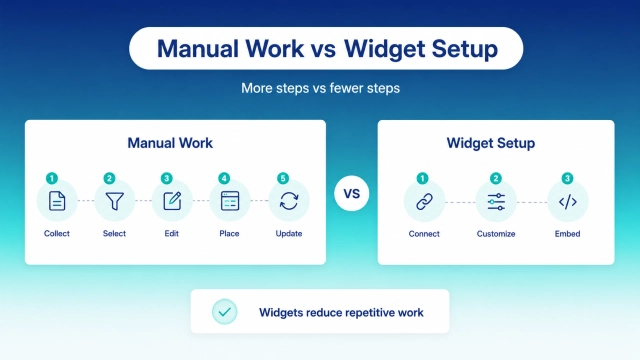
A typical manual workflow may look like this:
- Ask a customer for a testimonial.
- Receive the testimonial.
- Decide whether it should be published.
- Get any required customer information or assets.
- Add the testimonial to the CMS.
- Format it correctly.
- Check how it looks on desktop and mobile.
- Replace older testimonials later.
Repeat this process every time you want the section to stay fresh.
Design and Customization
This is an area where manual testimonials traditionally have an advantage.
Because you are creating the section yourself, you can design almost anything.
You can control typography, spacing, images, animations, customer logos, background colors, quote length, card size, placement, and interactions.
You can even build testimonials directly into another section rather than displaying them as standalone cards.
For a highly customized marketing website, that flexibility can be valuable.
However, using a widget does not mean your review section has to look generic.
A Google Reviews Widget can be configured to match different page structures and design requirements.
For example, you might use:
a carousel in a compact homepage section;
a grid on a dedicated reviews page;
a slider between product sections;
a badge close to a CTA or booking form.
Different layouts solve different problems.
A large grid may be useful when visitors actively want to explore reviews. A compact badge may work better when the goal is simply to reinforce trust next to an important action.
Which Option Is Better for SEO?
This question needs a careful answer.
Adding customer reviews to a website can make a page more useful for visitors, but installing a Google Reviews Widget should not be treated as an automatic SEO shortcut.
A widget does not guarantee higher rankings.
Likewise, simply adding a large number of testimonial blocks does not automatically improve organic search performance.
The main purpose of both Google reviews and testimonials should remain the same:
help visitors evaluate your business and make a more confident decision.
Useful customer feedback may add context to a page, answer common objections, and provide information about real customer experiences.
But SEO performance depends on many factors beyond whether reviews are present.
There is another important distinction: displaying Google reviews on your website does not automatically mean your pages will receive review stars in organic Google results.
Structured data and search result eligibility follow their own rules.
Cost: Google Reviews Widget vs. Manual Testimonials
Manual testimonials may initially appear to be the free option.
There is no software subscription required if your team simply adds the testimonials directly to your website.
But that doesn't necessarily mean there is no cost.
Manual testimonials require time.
For a small website with three testimonials, this may not matter.
For a business that receives customer feedback every week, the hidden maintenance cost can become much more significant.
A Google Reviews Widget introduces a tool into the process but reduces the amount of manual website management required.
This makes the comparison less about:
free vs. paid
and more about:
manual work vs. automation.
Best Choice by Business Type
The right option depends heavily on what you sell and how customers make their decisions.
Local Businesses
Best choice: Google Reviews WidgetFor businesses such as:
- restaurants;
- salons;
- dentists;
- repair companies;
- contractors;
- local stores;
- real estate agencies;
Google reviews are often already an important part of the customer's decision process.
Visitors may search for the business on Google before visiting the website anyway.
Displaying Google reviews directly on the site allows you to bring that existing social proof closer to your key conversion points.
A rating badge near a booking button, for example, can provide reassurance without forcing the visitor to leave the website.
Ecommerce
Best choice: Usually a combinationGoogle reviews can help establish trust in the overall business.
However, ecommerce stores may also benefit from product-specific reviews that help visitors evaluate individual items.
In this situation, different review systems serve different purposes.
Google reviews → trust in the store.
Product reviews → confidence in the individual product.
B2B Services
Best choice: Manual testimonials or bothFor a B2B buyer, the identity and context of the customer can be extremely important.
A testimonial from:
Sarah, Marketing Manager
may be useful.
A testimonial from:
Sarah Johnson, VP of Marketing at [Recognizable Company]
with a detailed description of the project is much stronger.
B2B testimonials can also be customized to address specific industries, company sizes, and use cases.
Google reviews can still reinforce general trust, but detailed testimonials often do more of the persuasion.
Agencies
Best choice: BothAgencies are a perfect example of why these approaches do not have to compete.
Google reviews can demonstrate that the agency consistently receives positive client feedback.
Detailed testimonials and case studies can show the actual work behind those ratings.
One builds confidence at a glance.
The other provides evidence for buyers who want to investigate further.
Can You Use Google Reviews and Manual Testimonials Together?
Yes.
In many cases, this is actually the strongest approach.
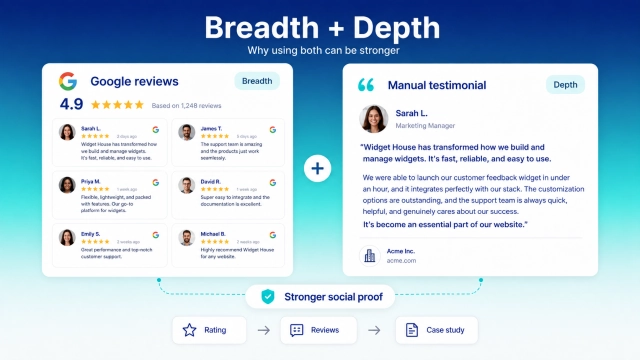
Google reviews and manual testimonials are not competing formats. They solve different parts of the trust problem.
A Google Reviews Widget gives you breadth of social proof.
It can show visitors that many customers have interacted with the business and shared their experiences.
A detailed testimonial gives you depth of social proof.
It allows one customer to explain their problem, experience, and result in much more detail.
For example, a service page might follow this structure:
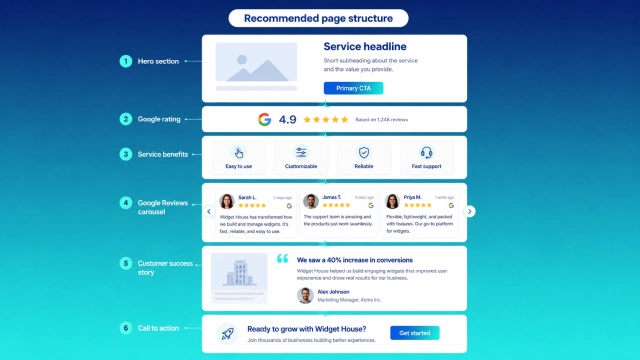
This works because each trust element answers a different question.
The rating answers:
“Do customers generally trust this company?”
The Google reviews answer:
“What are real customers saying?”
The detailed testimonial answers:
“Can this company solve a problem like mine?”
These are three different questions — and all of them can matter before a visitor converts.
Google Reviews Widget vs. Manual Testimonials: Final Verdict
So which one should you choose?
It depends on what you need from your social proof.
| If you need... | Better option |
|---|---|
| Recognizable third-party social proof | Google Reviews Widget |
| Reviews that stay fresh with less manual work | Google Reviews Widget |
| Easy scalability | Google Reviews Widget |
| Fast website implementation | Google Reviews Widget |
| Full editorial control | Manual testimonials |
| Detailed customer stories | Manual testimonials |
| Specific B2B results | Manual testimonials |
| Maximum variety of social proof | Use both |
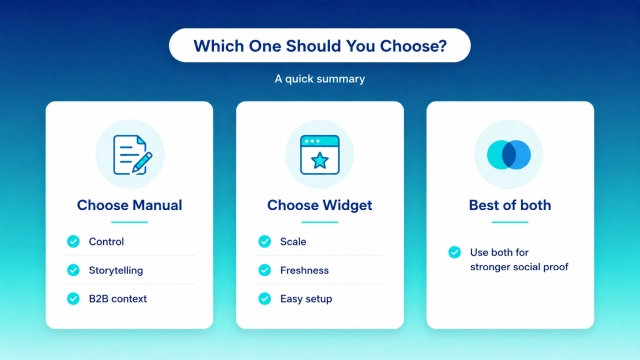
For most local businesses and service websites, a Google Reviews Widget is the easier and more scalable way to bring existing customer feedback onto the website.
You do not have to manually recreate every review, and visitors immediately recognize where the feedback comes from.
Manual testimonials remain extremely valuable when you need more context, stronger storytelling, or specific customer outcomes.
For many websites, the best answer is therefore not:
Google Reviews Widget or testimonials?
It is:
Google Reviews Widget + carefully selected testimonials.
How to Add Google Reviews to Your Website
If you already have customer reviews on Google, you don't need to manually copy them into your website one by one.
With Widget House Google Reviews, you can create a review widget in four steps.
1. Choose a Template
Select a layout that fits your website and the place where you want to show the reviews.
You can start with a carousel, grid, slider, badge, or another available design.
2. Connect Your Review Source
Connect the Google reviews you want to display.
3. Customize the Widget
Adjust the appearance of the widget so it works naturally with the rest of your website.
Customization is optional — you can use a ready-made template or adapt it to your design.
4. Add the Widget to Your Website
Copy the generated code and add it to the page where you want the reviews to appear.
No need to manually create and update individual review cards.
Frequently Asked Questions
Are website testimonials trustworthy?
They can be.
Testimonials tend to be more convincing when visitors can clearly understand who provided them and what experience the customer had.
Adding a real name, role, company, photo, or detailed context can make a testimonial more useful than a generic anonymous quote.
However, because businesses choose which testimonials appear on their own websites, visitors may perceive them differently from reviews hosted on an independent platform.
Should I show all Google reviews on my website?
Not necessarily.
The goal should be to create a useful review experience rather than overwhelm the visitor.
The right number of visible reviews depends on where the widget appears, the layout you use, and what visitors are trying to accomplish on the page.
A compact homepage section might need only a handful of visible reviews, while a dedicated reviews page can support a larger collection.
How many testimonials should I display?
There is no universal number.
A few highly relevant testimonials can be more persuasive than a long collection of generic quotes.
Think about what questions or objections a visitor has on each page and choose testimonials that help answer them.
Does a Google Reviews Widget update automatically?
A connected review widget can reduce the need to manually copy and publish new reviews. The exact update behavior depends on the widget provider and configuration.
The main advantage is that your review section can be managed from a connected source instead of being rebuilt manually every time you want to show new feedback.
Can a Google Reviews Widget improve conversions?
A Google Reviews Widget can strengthen social proof and help visitors evaluate your business before taking action.
However, no widget can guarantee higher conversion rates.
The impact depends on factors such as:
- the quality and relevance of your reviews;
- where the widget appears;
- your overall page design;
- your offer;
- the visitor's intent;
- the rest of the customer journey.