
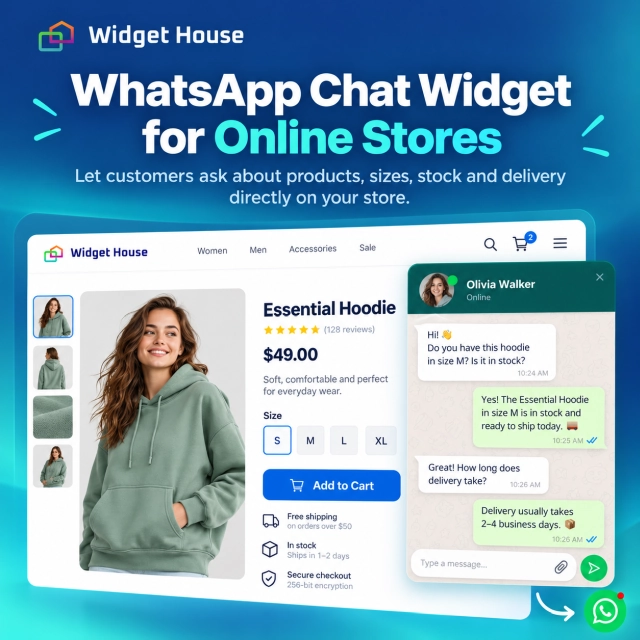
Online shoppers often leave a product page with one unanswered question. Will this size fit? Is this color actually in stock? Can it arrive before Friday? Does the product work with what I already own? What happens if I need to return it?
A WhatsApp Chat widget gives shoppers a direct way to ask those questions without searching for a support page, writing a formal email, or abandoning the store to look for an answer somewhere else.
Why WhatsApp Chat Makes Sense for Online Stores
A product page can contain a lot of information and still fail to answer the one question that matters to a specific shopper.
Ecommerce stores usually try to solve uncertainty with product descriptions, specifications, size guides, delivery pages, FAQs, and return policies. Those elements are essential, but they cannot anticipate every situation. A shopper may need clarification about a particular size, compatibility, delivery deadline, bundle, variant, or use case.
WhatsApp's official click-to-chat feature is built around reducing the friction of starting that conversation: a shopper can open a chat without first saving the business phone number. WhatsApp says click-to-chat works on phones and WhatsApp Web, and its links can also include a pre-filled message.
Use Case: From Product Question to Checkout
The widget should support the purchase journey instead of becoming a separate support destination.
1. Product discovery
The shopper lands on a product, category, collection, or campaign page from search, social media, an ad, email, or direct traffic.
2. Purchase uncertainty
They like the product but need one more answer about size, fit, color, compatibility, stock, delivery, returns, or another practical detail.
3. WhatsApp conversation
They open the chat widget and continue the conversation in WhatsApp instead of leaving the store to search for an answer elsewhere.
4. Return to the purchase
Once the uncertainty is resolved, the shopper can return to the product or cart and decide whether to complete the order.
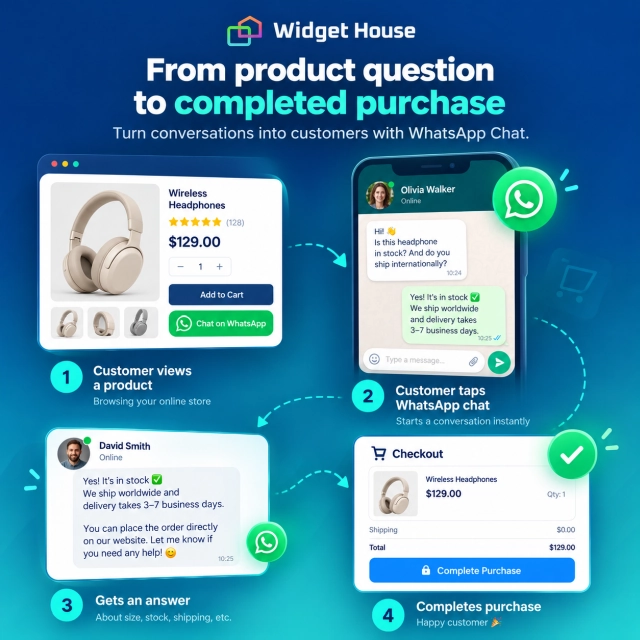
The purpose of chat is not to replace the product page. It is to resolve the exceptions the product page cannot predict.
The Questions Online Shoppers Most Often Need Help With
Different stores have different products, but purchase-blocking questions usually fall into a few predictable groups.
Product details
Materials, dimensions, features, care instructions, compatibility, included accessories, differences between models, or how the product works in a real situation.
Size and fit
Which size to choose, how a garment fits, whether footwear runs small, or which dimensions are appropriate for the customer's space or use case.
Availability
Whether a size, color, configuration, bundle, or specific variant is currently available or expected back in stock.
Shipping
Delivery timing, shipping regions, rush options, international delivery, order cutoffs, or whether an item can arrive before a particular date.
Returns and exchanges
Whether a product can be returned, exchanged for another size, or handled differently because it is customized, discounted, opened, or used.
Order support
Questions about changing an order, correcting information, combining purchases, or understanding what happens after checkout.
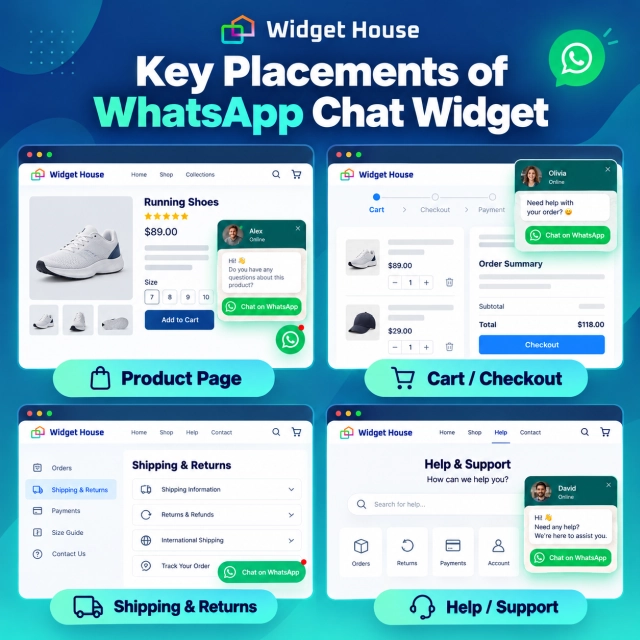
Best WhatsApp Chat Widget Placements for Ecommerce
The closer the widget is to a high-intent decision, the more useful the conversation can become.
| Store page | Typical question | Recommended approach |
|---|---|---|
| Product page | Size, fit, stock, color, compatibility, delivery | Button or Bubble close to product information and Add to Cart |
| Category / collection | Which product should I choose? | Bubble or Floating Chat available while browsing |
| Cart | Shipping, delivery timing, coupon or order question | Compact chat access that does not compete with Checkout |
| Shipping / returns | Does this policy apply to my order? | Button or Floating Chat beside policy content |
| Contact / help | I need a human answer | Floating Chat with a clear welcome message |
Which WhatsApp Widget Format Fits Each Store Page?
Widget House currently offers Bubble, Button, Popup, and Floating Chat formats for WhatsApp Chat.
Source: Widget House — Apps.
Bubble
A good default for sitewide access. It stays available while shoppers move between products, categories, policies, and support pages without taking over the page.
Button
Useful when you want WhatsApp tied to a specific intent: Ask about size, Check availability, Ask about delivery, or Need help choosing?
Popup
Useful when you want a more visible prompt on selected high-intent journeys. Keep the message contextual and avoid interrupting shoppers who are already moving smoothly toward checkout.
Floating Chat
Best when customers may have several questions. Widget House describes this layout as a fuller chat-style interface with more space for a welcome message and a clear path into WhatsApp.
Widget House says the Floating Chat template lets businesses customize the WhatsApp number, welcome message, visual style, position, and other chat settings. On mobile, the widget can open the WhatsApp app directly.
Use WhatsApp Differently on Product Pages
A product page needs reassurance without letting chat overpower the purchase interface.
A shopper who is ready to buy should still see product options, quantity, price, delivery information, and Add to Cart first. WhatsApp works best as a supporting route for uncertainty.
Good prompts
- Need help choosing a size?
- Ask about availability
- Questions about this product?
- Need it by a specific date?
- Not sure which model fits?
Avoid
- Replacing Add to Cart with chat
- Hiding basic product information behind WhatsApp
- Using vague “Message us” prompts with no context
- Opening an aggressive popup immediately on every product page
- Making customers ask for prices or core policies that should already be visible
Why Mobile Matters for Ecommerce WhatsApp Chat
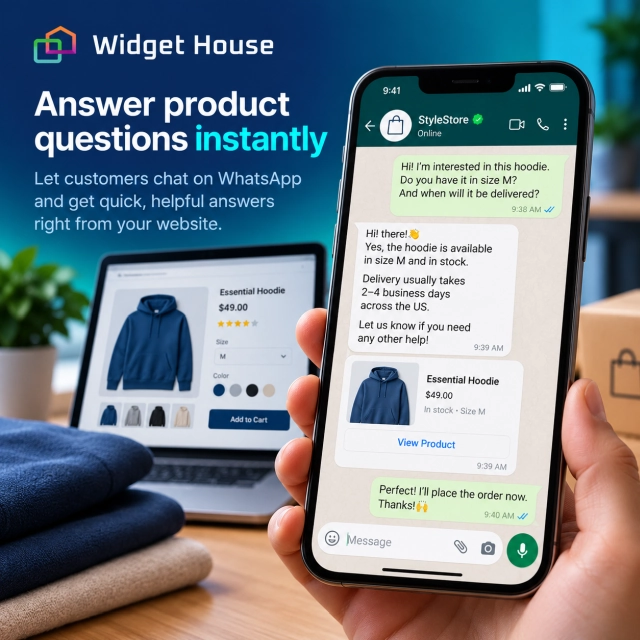
On mobile, the distance between browsing a store and messaging the business can be especially short.
WhatsApp's click-to-chat flow works on mobile and WhatsApp Web. Widget House also states that its WhatsApp widget is responsive and that, on mobile, clicking the chat icon opens the WhatsApp app directly.
Sources: WhatsApp — Click to chat and Widget House — Floating Chat.
The practical implication is simple: keep the mobile widget visible without covering sticky Add to Cart bars, variant selectors, checkout controls, consent banners, or other interface elements that already compete for limited screen space.
How Widget House Fits the Online Store Use Case
An online store should not need a custom development project just to give shoppers a clear path into WhatsApp.
Widget House provides ready-made WhatsApp Chat widgets that can be customized and embedded on a website. The current app library includes Bubble, Button, Popup, and Floating Chat. The Floating Chat editor supports configuration such as the WhatsApp number, welcome text, style, and position.
Widget House also publishes ecommerce-oriented installation guidance. For example, its Ecwid guide supports adding a WhatsApp Chat widget to a specific product or category page or displaying it across the whole storefront.
Sources: Widget House — Apps, Widget House — Floating Chat, and Widget House — Ecwid installation guide.
Preview a WhatsApp Chat layout, adjust the message and appearance, and choose whether the widget should support one high-intent page or remain available throughout the storefront.
A Simple Implementation Plan for an Online Store
- List your real purchase blockers. Start with the questions customers already ask about products, sizing, stock, shipping, returns, and compatibility.
- Choose the main placement. Use a Button for a specific product question or a Bubble/Floating Chat when support should remain accessible throughout the store.
- Write a contextual welcome message. Tell the shopper what they can ask instead of using a generic greeting with no ecommerce context.
- Keep checkout dominant. On cart and checkout-adjacent pages, WhatsApp should be available but visually secondary to the primary purchase action.
- Keep policies in HTML. Delivery, returns, pricing, stock, and product specifications should remain visible and maintainable on the store itself.
- Test mobile carefully. Check the widget against sticky cart bars, variant selectors, cookie notices, and small-screen navigation.
- Review the conversations. Repeated questions reveal gaps in product copy, size guides, shipping information, or FAQs that the store should improve for everyone.
Frequently Asked Questions
Where should an online store place a WhatsApp Chat widget?
Start on product pages and keep it available on category, shipping, returns, and support pages. For sitewide access, a Bubble or Floating Chat works well. For a specific purchase question, use a Button near the relevant product information.
What should shoppers use WhatsApp for?
Typical questions include size and fit, product compatibility, availability, delivery timing, return or exchange details, and help choosing between products.
Should WhatsApp replace ecommerce live chat or support pages?
Not necessarily. WhatsApp can be one communication channel alongside email, help content, order tracking, and other support tools. Important store information should remain available directly on the website.
Can customers start a WhatsApp chat without saving the store number?
Yes. WhatsApp's click-to-chat feature lets a customer start a chat without first saving the phone number, as long as the number has an active WhatsApp account.
Which Widget House WhatsApp layout is best for product pages?
A Button is useful when the chat prompt belongs to a specific product question. A Bubble is better for persistent access, while Floating Chat gives more room for a guided welcome message when shoppers may need broader support.
Final Takeaway: Put WhatsApp Where Product Uncertainty Happens
For ecommerce, the best chat widget is not the one that appears everywhere most aggressively. It is the one that appears when a shopper genuinely needs help making a decision.
Product pages, size choices, availability, delivery questions, returns, and complex product comparisons are natural moments for WhatsApp. The store should provide the facts; the conversation should handle the shopper's specific situation.