

Home services are built on trust before the technician ever reaches the door. A homeowner may be choosing who will enter their house, diagnose an expensive problem, work on a roof, repair a heating system, handle a water leak, or clean a space where their family lives.
That makes reviews especially valuable for HVAC companies, plumbers, roofers, electricians, cleaning services, pest-control companies, landscapers, remodelers, and other local contractors. The customer is not only asking, “Can this company do the job?” They are also asking, “Will they show up, communicate clearly, charge fairly, respect my home, and do what they promised?”
Why Google Reviews Matter So Much for Home Services
Many home-service decisions combine urgency, uncertainty, and high perceived risk.
A leaking pipe may need attention today. A roof replacement can cost enough that the homeowner compares several contractors. An HVAC replacement requires trust in both the recommendation and the installation. A recurring cleaning service means giving someone regular access to the home.
Google treats many of these companies as service-area or hybrid businesses. A service-area business visits customers directly rather than serving them at a storefront; Google specifically uses plumbers and cleaning services as examples. A verified Business Profile can show services, service areas, phone number, website, hours, and reviews in Search and Maps.
Google also says local results are mainly based on relevance, distance, and prominence, and that more reviews and positive ratings can help local ranking. For eligible businesses using Local Services Ads, Google says star rating and review count also affect ad ranking.
Sources: Google - Business Profile for service businesses overview, Google - Tips to improve your local ranking, and Google - Reviews and Ratings on Local Services Ads.
For the distinction between local rankings and review proof on a website, read Do Google Reviews on Your Website Help SEO?
Use Case: From “Contractor Near Me” to a Booked Job
A Google Reviews widget is most useful when it supports the decision at the point where a homeowner is choosing whether to call, request a quote, or book service.
1. Local discovery
The customer searches for a plumber, HVAC technician, roofer, cleaner, electrician, or another contractor in Google Search or Maps.
2. Shortlist
They compare ratings, review volume, service areas, hours, photos, availability, and several competing businesses.
3. Website verification
They open the website to check services, emergency availability, credentials, financing or estimate process, warranties, and whether the business serves their area.
4. Contact or booking
They call, request an estimate, submit a lead form, schedule service, or keep comparing contractors.
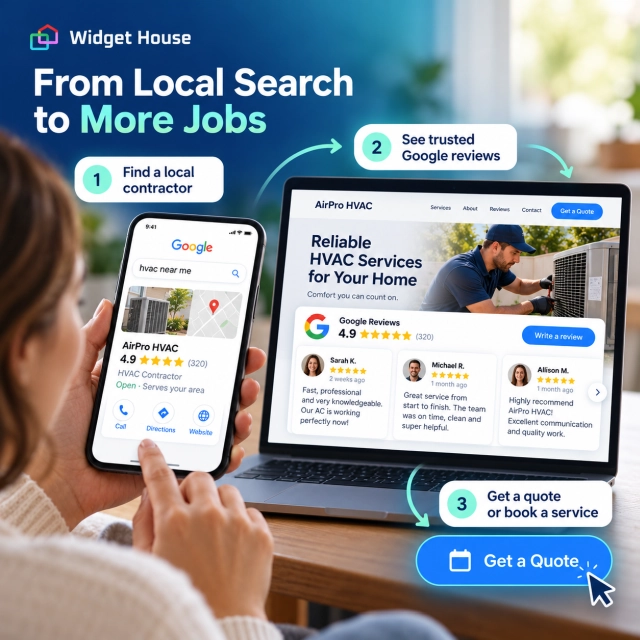
The website should make the contractor feel as credible at the conversion point as the business looked in Google.
What Homeowners Look for in Contractor Reviews
The star rating creates the first impression. The review text helps the customer understand what working with the company is actually like.
Useful themes vary by category, but home-service reviews commonly help people evaluate:
Responsiveness
Did the company answer quickly, arrive when promised, and communicate delays?
Professionalism
Did the technician explain the problem clearly, treat the homeowner respectfully, and behave professionally inside the home?
Price transparency
Did the customer understand the quote, scope, and charges before work began?
Quality of work
Was the repair, installation, cleaning, or project completed correctly and did the result meet expectations?
Cleanliness and care
Did the crew protect the property, clean up after the job, and leave the space in good condition?
Reliability after the job
If a problem appeared later, did the business respond and stand behind its work?
Google says certain service businesses can also receive feedback on specific aspects of the customer experience and on the type of job performed. Those details can make service-business reviews more useful than a star score alone.
Best Google Reviews Widget Placements for Home-Service Websites
Match the amount of social proof to the size and urgency of the decision.
| Page or section | Recommended layout | Why it fits |
|---|---|---|
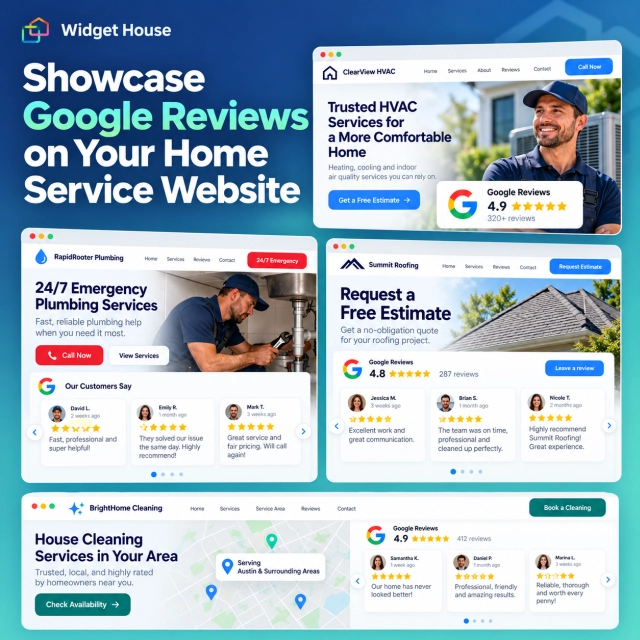
| Homepage hero | Badge | Puts a recognizable rating beside Call Now or Request an Estimate without distracting from the main action. |
| Emergency service page | Badge | Urgent visitors need reassurance quickly; a compact signal is easier to process than a large review section. |
| HVAC, plumbing, roofing, cleaning, or other service page | Carousel or Slider | Adds several customer experiences near the service explanation and quote CTA without overwhelming the page. |
| High-ticket project page | Carousel or Grid | Roof replacement, HVAC installation, remodeling, and similar projects justify deeper proof before a homeowner requests an estimate. |
| Service-area or location page | Grid | Supports deeper evaluation while the customer verifies that the contractor serves the area and has a strong local reputation. |
| Dedicated reviews page | Grid or Wall | Gives customers who want extensive proof a place to explore more feedback without crowding conversion pages. |
Widget House’s layout guide recommends Badge for fast reassurance, Carousel or Slider for compact social proof, and Grid or Wall for deeper review browsing.
Source: Widget House - Google Reviews Widget Layouts for Every Page.
Emergency Jobs and Planned Projects Need Different Review Depth
Someone with no heat, no cooling, a burst pipe, or an electrical problem behaves differently from someone planning a roof replacement or major installation.
Emergency service
The customer is trying to reduce risk fast. Keep the trust signal compact and close to the phone number or booking action.
- Badge near Call Now
- Short proof near emergency availability
- Clear service area and hours
- Minimal distractions
Planned, high-ticket project
The customer is more likely to compare companies in depth before requesting an estimate.
- Several detailed reviews
- Project or service information
- Clear estimate process
- Warranty, financing, and credential information where applicable
Use Reviews Carefully on Service-Area and Location Pages
Home-service businesses often operate across multiple cities without maintaining a customer-facing storefront in every area. Google’s rules matter here.
If you travel to customers and do not serve them at your business address, Google classifies the business as a service-area business and says the address should be hidden from customers. Google also says businesses should define accurate service areas, and separate profiles are appropriate only for distinct locations with separate staff and service areas.
For the website, this means a city or service-area page should not pretend there is a physical office where one does not exist. Use the page to explain the actual service area, the work offered there, and the next step for the customer.
Reviews can support that page, but they should not be used to manufacture a false local presence. A review from a real customer can reinforce trust; it does not turn a virtual address or unstaffed location into a legitimate branch.
Sources: Google - Guidelines for representing your business and Google - Manage your service areas.
How Home-Service Businesses Can Ask for Google Reviews After a Job
Ask after the customer has actually experienced the service, and keep the request neutral.
Google allows businesses to share a direct review link or QR code. It specifically suggests using the link in receipts, thank-you emails, and at the end of chat interactions.
For home services, practical moments include:
- a thank-you email after the work order is completed;
- an SMS follow-up after the customer confirms the issue is resolved;
- a review link on a digital invoice or receipt;
- a neutral follow-up after installation, cleaning, inspection, or project completion.
Do not offer a discount, free maintenance, gift card, warranty extension, or other benefit in exchange for a review. Do not ask only satisfied customers to post publicly while routing unhappy customers somewhere private. Google prohibits incentives and selective positive-review solicitation.
Sources: Google - Create a review link or QR code and Google Maps - Prohibited & restricted content.
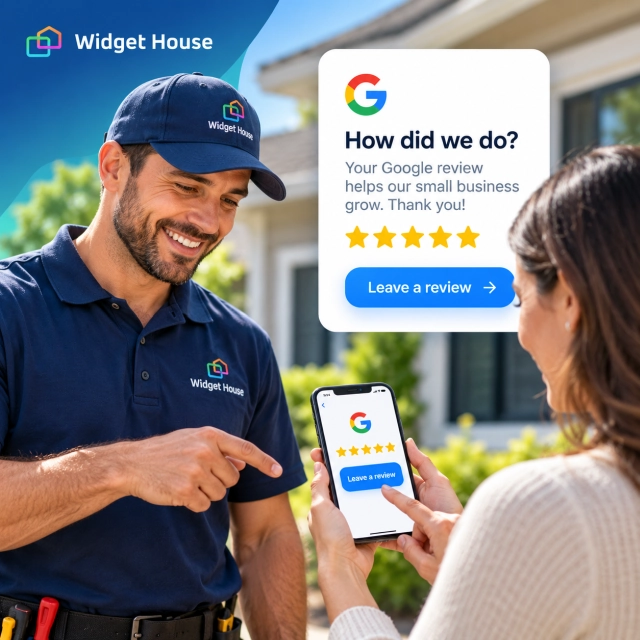
For neutral request templates and a consistent follow-up process, see How to Get More Google Reviews: 10 Ways to Encourage Honest Feedback.
How Widget House Fits the Home Services Use Case
A contractor should not need to build and maintain a review-display system just to put trustworthy social proof near a quote form.
The Widget House Google Reviews Widget provides ready-made layouts that can be adapted to different parts of a home-service website. Use a compact Badge where the call or estimate action must remain dominant, a Carousel or Slider where customers need several examples, and Grid or Wall when deeper evaluation makes sense.
Preview your own Google Reviews and compare layouts before adding the widget to your homepage, service pages, estimate flow, or service-area pages.
A Simple Implementation Plan for a Home-Service Website
- Start with the homepage. Put a Badge close to the main Call Now, Book Service, or Request an Estimate CTA.
- Add reviews to your highest-value services. Prioritize the service pages that generate the most calls or revenue.
- Adapt depth to intent. Keep emergency pages concise; give planned-project visitors more review depth.
- Support service-area pages honestly. Make the actual coverage area clear and avoid implying a storefront that does not exist.
- Keep factual trust information outside the widget. Credentials, warranties, estimate terms, hours, and availability belong in the page content.
- Ask every eligible customer neutrally. Send the same honest review request without incentives or review gating.
- Test the full lead path. Check the page on mobile, verify that review proof does not push the CTA too far down, and make sure calls and forms remain easy to complete.
Frequently Asked Questions
Where should an HVAC or plumbing company put a Google Reviews widget?
Start with a compact Badge near Call Now, Book Service, or Request an Estimate. Add a Carousel or Slider to important service pages and use a Grid on a reviews or service-area page when customers want more detail.
Should a roofing company use more reviews than an emergency plumber?
Usually, yes. Roofing and major HVAC projects are planned, higher-consideration purchases, so customers may benefit from deeper social proof. Emergency visitors often need fast reassurance and a clear contact action.
Can a service-area business show Google Reviews on city pages?
Yes, as long as the page accurately represents where the business really provides service. Reviews should support trust, not imply that the company has a staffed physical office in every city.
Do Google Reviews on a contractor website improve local rankings?
Google Business Profile reviews can contribute to local prominence. Displaying those reviews on the website is mainly a trust and conversion tactic; installing a review widget does not create an automatic ranking boost.
Can contractors give customers a discount for leaving a Google review?
No. Google prohibits incentives such as discounts, free goods, services, or other benefits in exchange for reviews. Requests should be neutral and based on genuine customer experiences.
Final Takeaway: Put Trust Next to the Homeowner’s Next Decision
For home services, trust is not an abstract branding goal. It directly affects whether the customer makes the call, requests the estimate, or keeps searching.
A strong Google Reviews widget strategy does not mean placing the same oversized review block on every page. It means giving the homeowner the right amount of proof at the right moment: a Badge for fast reassurance, a Carousel for service-page context, and a Grid when deeper comparison is justified.