
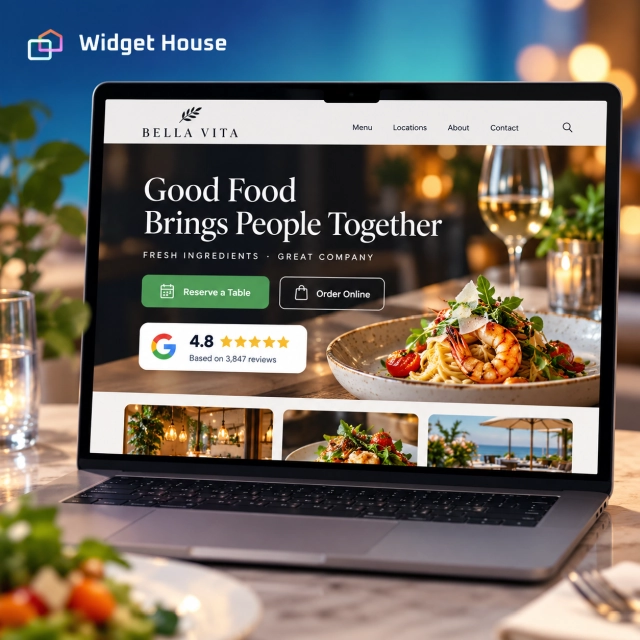
A restaurant website often receives visitors who have already seen the business somewhere else: Google Search, Google Maps, social media, a recommendation, or an AI-assisted local search result.
At that point, the website does not need to introduce the restaurant from zero. It needs to confirm that the place feels right, answer practical questions, and make the next step - reserve, order, call, or get directions - easy.
Why Google Reviews Matter for Restaurants and Cafés
A star rating creates a fast impression. Review text explains what the experience is actually like.
Google says reviews can help a business stand out and give potential customers useful information. Google also lists review count and positive ratings among the signals that can contribute to local prominence, alongside relevance, distance, links, and other factors.
For a restaurant or café, the most useful review content often answers questions that the menu alone cannot:
- Is the food consistently good?
- Is service quick, attentive, or relaxed?
- Is the atmosphere quiet, lively, romantic, family-friendly, or suitable for working?
- Do guests mention outdoor seating, parking, queues, or reservations?
- Are dietary needs handled well?
- Do specific dishes or drinks come up repeatedly?
Displaying selected Google review proof on the website can keep that context close to the menu, location details, and booking actions instead of sending the visitor back to Google to continue researching.
Sources: Google - Tips to get more reviews and Google - Tips to improve your local ranking.
Use Case: From “Restaurant Near Me” to Reservation or Order
The strongest review placement follows the guest journey instead of treating reviews as a separate testimonials page.
1. Discovery
A guest discovers the restaurant through Search, Maps, social media, an ad, or an AI-assisted recommendation.
2. Comparison
They compare ratings, photos, cuisine, distance, opening hours, price level, and a few competing options.
3. Website verification
They open the website to check the menu, atmosphere, location, booking options, and whether the experience matches what they saw elsewhere.
4. Action
They reserve a table, order online, call, save the location, or get directions.
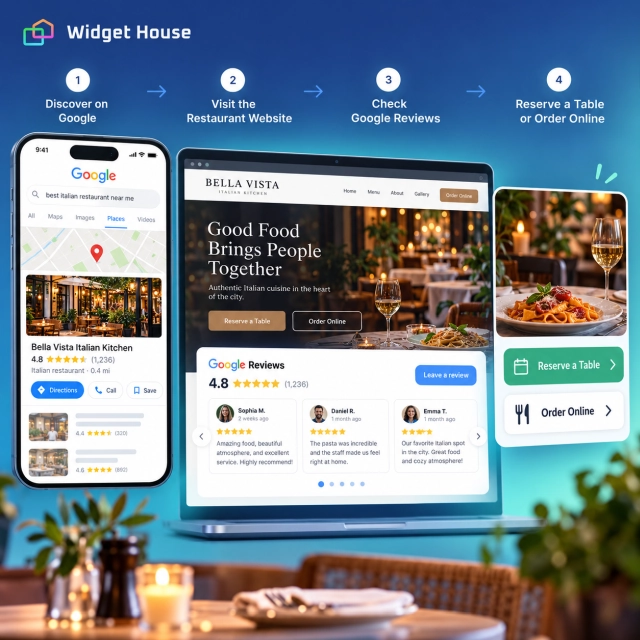
The widget should reduce hesitation at step three without slowing down step four.
Best Google Reviews Widget Placements for Restaurants & Cafés
The right layout depends on how much attention guests should give reviews on that page.
| Page or section | Recommended layout | Why it fits |
|---|---|---|
| Homepage hero | Badge | Adds immediate reputation proof beside Reserve a Table, Order Online, or Get Directions without taking over the hero. |
| Homepage or menu section | Carousel or Carousel Photos | Shows several guest experiences in limited space. Photos are especially useful when food, drinks, or atmosphere are part of the decision. |
| Reservation or order page | Badge | Provides one last trust signal close to commitment without adding a large distraction. |
| Location page | Grid | Gives visitors more review depth while they evaluate the venue, neighborhood, parking, and overall experience. |
| Catering, events, or private dining | Slider or Carousel | Lets a few detailed customer stories reinforce a higher-consideration service. |
| Dedicated reviews page | Grid or Wall | Gives guests who intentionally want deeper social proof more room to explore. |
Widget House specifically recommends Carousel Photos for categories where the customer experience is visual, including restaurants, cafés, and hospitality. A standard Carousel is usually cleaner when most of the available reviews are text-only.
A practical combination for many food businesses is Badge near the primary CTA + Carousel Photos or Carousel lower on the homepage + Grid on the location or reviews page.
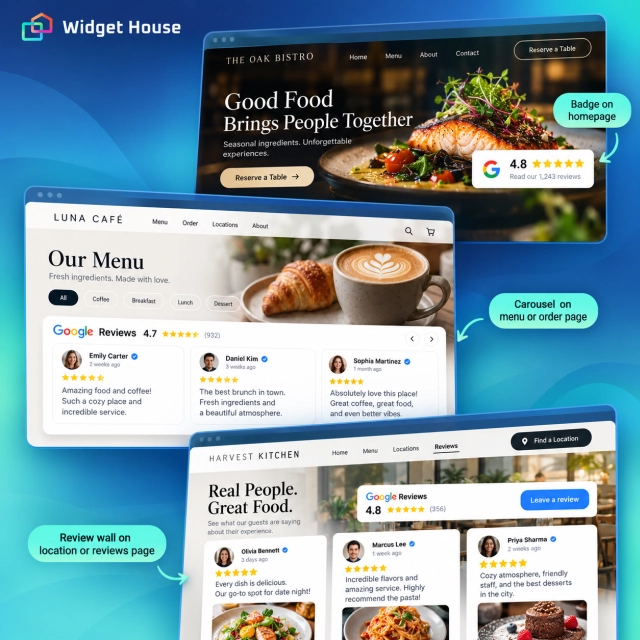
Source: Widget House - Google Reviews Widget Layouts for Every Page.
Example: A Dinner Reservation Page
A reservation page is a good example of where less social proof can be more useful.
Imagine a visitor has already checked the menu and wants to book dinner for Friday night. The page could contain:
- A clear reservation headline and available booking options.
- Essential information such as party size, date, time, and location.
- A compact Google Reviews Badge close to the booking form or button.
- A short note about cancellation, accessibility, or dining policies where relevant.
- The primary reservation action without another large review section competing for attention.
Use Reviews to Confirm the Experience, Not Replace Restaurant Content
Reviews are strongest when they reinforce information the restaurant already explains clearly.
Your website should own the facts
Keep menus, prices, opening hours, reservation rules, address, accessibility information, dietary guidance, and contact details in normal website content that you control and can update directly.
Reviews should add lived experience
Use reviews to show how guests describe the food, team, atmosphere, convenience, and overall visit in their own words.
For example, the restaurant can state that it has a patio. Reviews can add the human context: guests may describe it as quiet, shaded, good for families, or lively in the evening.
The distinction matters because user-generated feedback can change and should not be the only source for operational information.
How Restaurants and Cafés Can Ask for Google Reviews
The best review program makes it easy to leave honest feedback without influencing what the customer says.
Google provides a review link and QR code that businesses can share. Google specifically suggests using the link or QR code on receipts, in thank-you emails, after chat interactions, or displayed in the business.
Good review requests
- Add a neutral review QR code to a receipt or table card.
- Send the Google review link in a post-visit thank-you message.
- Ask every customer using the same neutral language.
- Make feedback optional and easy.
Avoid this
- “Get a free dessert for leaving a review.”
- “Leave us five stars and receive 10% off.”
- Only sending the review link to customers who said they were happy.
- Asking staff to pressure guests into posting a specific rating or wording.
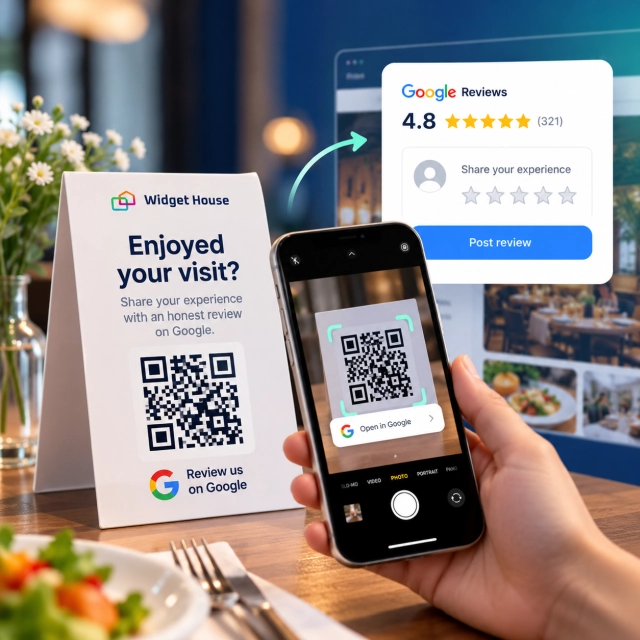
Google says reviews must reflect genuine experiences. Incentives such as discounts, free goods, or services in exchange for reviews are prohibited, and businesses should not selectively solicit only positive feedback.
Sources: Google - Create a Google link or QR code to request reviews and Google Maps User Generated Content Policy.
For neutral request templates and a practical review collection process, see How to Get More Google Reviews.
How Widget House Fits the Restaurant & Café Use Case
The goal is not to turn every page into a review gallery. It is to choose the right amount of proof for each decision.
With the Widget House Google Reviews Widget, you can connect your Google reviews, choose a layout, customize the appearance to fit the website, preview the result, and add the finished widget to your pages.
Preview Badge, Carousel, Carousel Photos, Slider, Grid, List, Sidebar, and Wall layouts and compare how much review proof fits naturally around your menu, reservation, and location content.
The value is practical: a café can keep a small Badge near Order Ahead, a restaurant can place a visual Carousel below its menu highlights, and a venue with a detailed location page can provide a deeper Grid without rebuilding each review section manually.
Source: Widget House - Do Google Reviews on Your Website Help SEO?.
A Simple Implementation Plan for a Restaurant Website
1. Add fast proof to the homepage
Place a Badge near Reserve, Order, Call, or Get Directions, depending on the site’s primary action.
2. Show the experience visually
Use Carousel Photos when guest images add meaningful context. Use a standard Carousel when text is the stronger proof.
3. Give location pages more depth
Use a Grid or another richer format where visitors are comparing the venue, neighborhood, parking, atmosphere, and practical details.
4. Make review collection routine
Use Google’s review link or QR code consistently after genuine visits, without discounts, freebies, or positive-review filtering.
Frequently Asked Questions
What is the best Google Reviews widget layout for a restaurant homepage?
A Badge works well near the main Reserve a Table or Order Online CTA. Lower on the page, Carousel or Carousel Photos can provide richer social proof without making the homepage excessively long.
Are review photos useful for restaurants and cafés?
They can be. Food, drinks, atmosphere, and hospitality are highly visual, so a Carousel Photos layout can add useful context when enough reviews contain relevant images. If most reviews are text-only, a standard Carousel is usually cleaner.
Where should a café display Google reviews?
Good placements include the homepage, menu or food sections, location pages, order-ahead pages, contact sections, and a dedicated reviews page. Match the layout size to how much attention guests should give reviews at that point.
Can a restaurant offer a free item in exchange for a Google review?
No. Google prohibits incentives such as free or discounted goods or services in exchange for reviews. Review requests should be neutral and based on genuine customer experiences.
Do Google Reviews widgets improve restaurant SEO?
Reviews on the Google Business Profile can contribute to local prominence, but adding a reviews widget to the website is not an automatic ranking boost. The widget’s main role is to keep social proof current and support customer decisions on the website.