
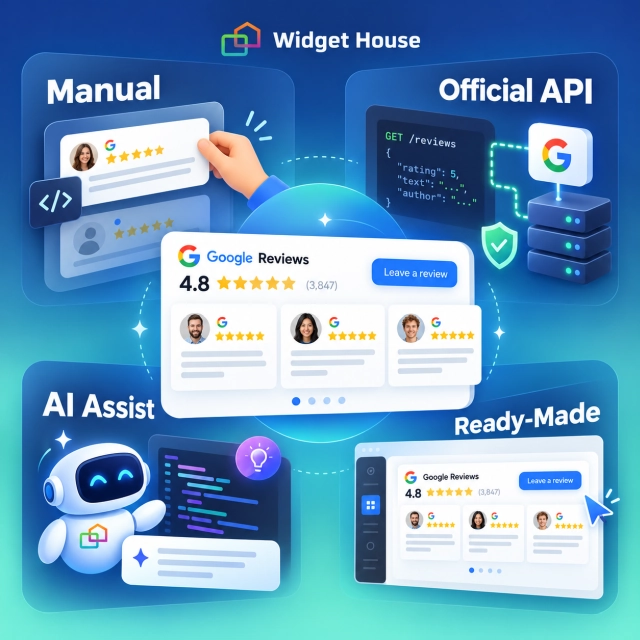
A Google Reviews widget looks simple from the outside: a rating, several stars, a few customer comments, and perhaps a button that opens Google Maps.
The visible cards are the easy part. The difficult part is everything behind them: getting legitimate review data, refreshing it, following attribution and storage rules, keeping API credentials secure, handling errors, supporting mobile screens, and maintaining the integration when an API or website changes.
You can absolutely build a Google Reviews widget yourself. The real question is whether you want to build a visual block, a live data integration, or a small software product that you will continue to operate.
This guide compares the main routes: manual HTML, official Google APIs, third-party review APIs, AI-assisted development, and ready-made widget services such as Widget House and similar products.
What Does “Build It Yourself” Actually Mean?
Before estimating time or cost, separate three very different projects that are often described with the same word: widget.
Static review cards
You manually copy a rating and selected review text into HTML. The page can look convincing, but nothing updates automatically. This is closer to a testimonial section than a live Google Reviews widget.
Custom live integration
Your website requests review data from Google or another provider, processes the response, stores only what the terms allow, and renders the result through your own interface.
Ready-made widget
A service handles the data connection, updates, layouts, responsive behavior, limits, and installation code. You configure the presentation instead of building the infrastructure.
AI-assisted build
An AI coding tool can accelerate either of the first two routes. It can write code, but it does not become the review data source or remove your responsibility for security, policies, and maintenance.
The more “live” and reusable the widget needs to be, the less it behaves like a design task and the more it behaves like a software integration.
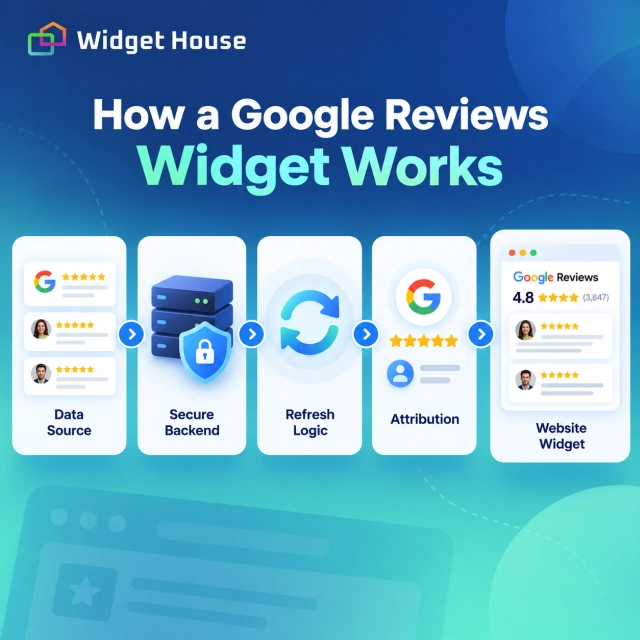
What a Production Google Reviews Widget Actually Needs
A polished frontend is only one layer of the project.
1. A permitted data source
You need a reliable way to retrieve the rating, review count, review text, reviewer attribution, timestamps, and links back to Google where required.
2. Authentication and key security
Google Maps web-service keys should not be exposed in public frontend code. Google recommends restrictions and, for server-side web-service calls, secure server-side handling.
3. Refresh and storage logic
The widget needs a refresh schedule and a policy-compliant way to handle temporary storage. Google Places and Business Profile content cannot simply be copied into a permanent local database without considering the applicable terms.
4. Attribution
Google review data must be displayed with the required Google attribution and reviewer information. A custom design does not remove attribution obligations.
5. A responsive interface
You need layouts for desktop and mobile, long-review truncation, navigation controls, accessible markup, loading states, empty states, and graceful handling when the data source is unavailable.
6. Ongoing operations
Someone must monitor failures, usage limits, API changes, expired credentials, performance, and compatibility with the website platform.
Sources: Google Maps Platform security guidance and Places API policies and attribution requirements.
Four Ways to Get Google Review Data
The data source determines what you can display, how difficult the integration will be, and what policies apply.
1. Copy Reviews Manually
The simplest route is to create review cards in ordinary HTML and update them by hand. There is no API bill, no authentication flow, and almost no backend work.
Advantages
- Fastest custom build
- Complete control over the layout
- No API usage fees
- Works on almost any website
Limitations
- Reviews become stale
- Every update is manual
- Easy to lose links and attribution
- Not a genuine live integration
Planning estimate: 2-6 hours for the first version, then 30-120 minutes whenever you want to refresh the displayed reviews.
2. Use the Google Places API
The Places API is the most accessible official Google route for public place data. The important limitation is that the Place Details response returns a maximum of five reviews, sorted by relevance.
To request the reviews field in Places API (New), Google categorizes the request under Place Details Enterprise + Atmosphere. As of November 7, 2026, the pricing page lists a monthly free usage cap of 1,000 requests and a price of $25 per 1,000 requests for the first paid tier.
Sources: Places API place resource and Google Maps Platform pricing.
Planning estimate: 16-32 development hours for a stable single-location implementation, including a backend endpoint, secure keys, display states, attribution, testing, and deployment.
3. Use the Google Business Profile API
The Business Profile API is more suitable when you own or manage the verified location and need a paginated list of reviews. The reviews endpoint can return up to 50 reviews per page and includes average rating and total review count.
The API itself is available to registered users at no charge, but access is not automatic. Google requires an approved project, a business reason, a Business Profile verified and active for at least 60 days, a website representing the business, and OAuth authorization. Allow additional time for access review. The review endpoint only works for a verified location you are authorized to manage.
Sources: Business Profile API prerequisites, reviews.list documentation, and Business Profile API pricing.
Planning estimate: 24-50 development hours, plus the external waiting time for access approval. OAuth, token refresh, location selection, consent, and account edge cases make this route more complex than Places API.
4. Use a Third-Party Review API
Third-party providers can offer more reviews, different sorting options, or simpler access than official Google APIs. Their pricing may look inexpensive, but the vendor becomes part of your production infrastructure.
Current examples include Outscraper, which lists the first 500 Google Maps reviews as free and then $3 per 1,000 reviews; SerpApi, which lists a free plan with 250 searches and a $25/month Starter plan with 1,000 searches; and DataForSEO, which publishes pay-as-you-go review pricing but requires a $50 minimum top-up.
Sources: Outscraper pricing, SerpApi pricing, DataForSEO Google Reviews API pricing, and DataForSEO minimum payment.
Planning estimate: 12-24 development hours for a straightforward integration, plus the provider’s usage fees and the same frontend, monitoring, and maintenance work required by other custom builds.
Where AI Helps-and Where It Does Not
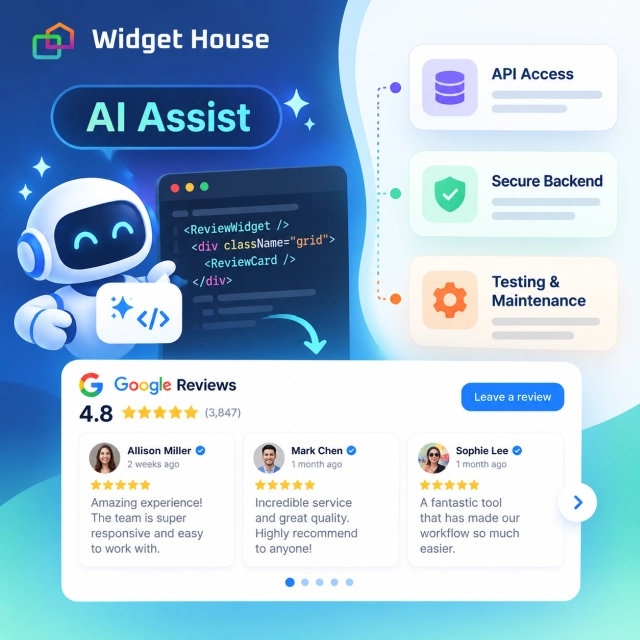
AI can reduce coding time, but it does not turn a prototype into a managed review platform.
AI can help with
- Generating HTML, CSS, and JavaScript
- Creating a server endpoint
- Writing API client code
- Producing responsive layouts
- Drafting tests and error states
- Explaining installation steps
- Refactoring and debugging
AI cannot replace
- API approval and OAuth consent
- Legitimate access to review data
- Correct policy interpretation
- Secure credential management
- Real-device testing
- Production monitoring
- Responsibility for future maintenance
A capable developer may create a convincing prototype with AI in 30-90 minutes. Turning it into a production feature can still take 8-20 hours or more because the difficult work involves credentials, policies, data states, deployment, and testing rather than writing the first card component.
Related reading: Can AI Replace Traditional Website Widgets?
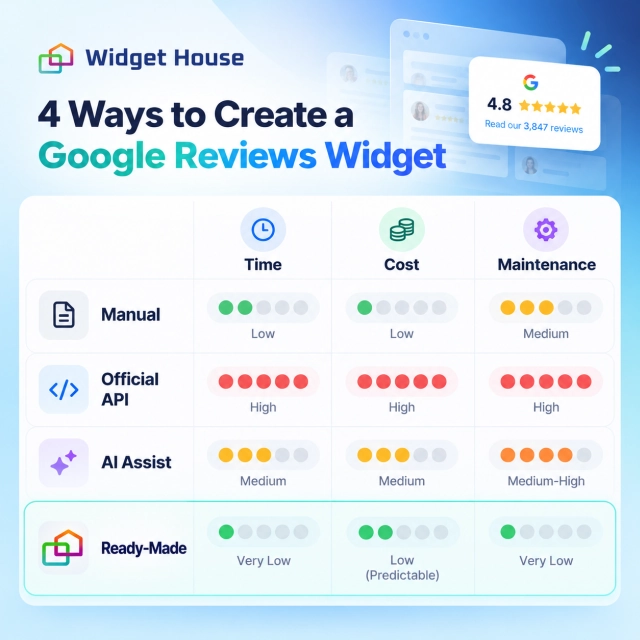
Time and Cost Comparison
The following figures are planning estimates, not vendor quotes.
To make the approaches comparable, the estimates assume one business location, an existing website, no custom moderation dashboard, and a development value of $75 per hour. Your actual cost can be lower if you build it yourself or higher if the project requires agency design, multiple locations, custom analytics, or enterprise security review.
| Approach | Initial time | Illustrative build cost | Ongoing cost | Main limitation |
|---|---|---|---|---|
| Manual static cards | 2-6 hours | $150-$450 | Manual update time | Not automatically synced |
| Google Places API | 16-32 hours | $1,200-$2,400 | Usage-based API + hosting + maintenance | Maximum 5 reviews returned |
| Business Profile API | 24-50 hours | $1,800-$3,750 | No API usage fee; hosting and maintenance remain | Approval, OAuth, and managed profiles only |
| Third-party review API | 12-24 hours | $900-$1,800 | Provider fee + hosting + maintenance | Vendor and compliance dependency |
| AI-assisted custom build | 8-20 hours | $600-$1,500 | Same data, hosting, and maintenance costs as the chosen API | AI is not the data source or operator |
| Ready-made widget service | 10-60 minutes | Usually no developer required | Free plan or subscription | You work within the service’s features and limits |
API calls are often the smallest part of the total cost. Development, testing, maintenance, and operational responsibility usually matter more.
Ready-Made Google Reviews Widget Services Compared
A ready-made product moves most of the technical work into a predictable subscription.
The table below uses the vendors’ official pricing pages as checked on November 7, 2026. Prices, discounts, features, and limits can change, so confirm them before purchasing. Widget House is our product; the other services are included to make the trade-offs visible.
| Service | Free plan | Entry paid plan | Included usage | Editorial fit |
|---|---|---|---|---|
| Widget House | 500 views/month | Basic: $3.99/month, billed yearly | 10,000 views/month, 50 widgets per project, up to 100 projects, no branding | Small businesses and agencies that want flexible layouts, full customization, and installation help at a low entry price |
| Elfsight | 1 widget, 200 views/month | Basic: $5/month, billed yearly | 3 widgets, 5,000 views/month | Users who want a mature widget catalog and a simple visual editor |
| SociableKIT | 1 source, 1 widget, 2,000 views/month | Pro: $10/month | 1 source, unlimited widgets and views, automatic sync | Businesses that value unlimited paid-plan views and use one main review source |
| EmbedSocial | 1 source, 500 views/month | Pro: $29/month | 3 sources, 5,000 views/month, unlimited widgets, three-hour sync | Teams that want review widgets together with broader social-media and listening features |
Our Google Reviews Widget currently offers a free plan and ready-made Google Reviews layouts including Badge, Slider, Carousel, and Grid. The workflow is to connect a Google Business Profile, customize the design, copy the generated installation code, and publish it on the website.
Sources: Widget House Google Reviews, Widget House pricing, Elfsight pricing, SociableKIT pricing, and EmbedSocial pricing.
For placement ideas, see Google Reviews Widget Layouts for Every Page.
Preview your own Google Reviews, compare layouts, and adjust the visual style before deciding whether a custom build is worth the extra work.
Hidden Challenges That Often Get Missed
A DIY widget can work well on launch day and still become expensive later.
Review limits
The official Places API does not provide an unlimited review feed. It returns a maximum of five reviews, which may be insufficient for a large Grid or Wall layout.
OAuth and ownership
The Business Profile API is powerful, but it only works for verified profiles the user is authorized to manage. Multi-client products need careful account and consent flows.
Caching restrictions
Google Places content cannot be stored indefinitely like ordinary CMS content. Business Profile API policies also limit stored content and generally require deletion within 30 days.
Attribution
Google logos, reviewer attribution, links, and third-party attributions must remain correct. A redesign can accidentally remove something required.
Security and unexpected bills
An unrestricted key can be abused. Google states that the project owner is financially responsible for charges caused by unauthorized use.
Performance
Images, scripts, animations, and repeated API requests can slow the page. The widget needs lazy loading, fixed dimensions, and a sensible refresh strategy.
Failure states
The page should still make sense if Google, a third-party API, or your own backend is unavailable. Empty containers and broken stars damage trust.
Maintenance ownership
Someone must update dependencies, review policy changes, renew credentials, and investigate when the data stops refreshing.
Sources: Places API policies, Business Profile API policies, and Google Maps Platform security guidance.
When Building It Yourself Makes Sense
Custom development is reasonable when the widget is part of a broader product rather than a small website enhancement.
- You already have a developer or product team.
- You need a unique interaction that ready-made tools cannot provide.
- You are integrating reviews into an internal dashboard or proprietary workflow.
- You need complete control over rendering, analytics, and deployment.
- You are prepared to own API access, security, compliance, monitoring, and maintenance.
- The expected business value justifies a four-figure initial build and recurring engineering time.
A custom build can also be a useful learning project. In that case, the Places API is often the clearest starting point because it provides official public place data without the full Business Profile authorization flow-provided that five reviews are enough for the prototype.
When a Ready-Made Widget Is the Better Decision
For most local businesses, marketers, freelancers, and agencies, the goal is not to operate a review-data system. The goal is to make trusted feedback visible on the website.
- You want the widget live today rather than next week.
- You do not have a backend developer.
- You need several layouts for different pages.
- You want to change colors, typography, cards, and spacing without editing code.
- You need installation support.
- You prefer a predictable subscription to unpredictable maintenance work.
- You manage several client sites and want a repeatable workflow.
Final Recommendation
Build a simple version yourself when you want to learn, need a very specific interface, or already have the engineering capacity to maintain the integration.
Use AI to accelerate implementation, but do not confuse generated code with a finished system. The data source, credentials, policies, error handling, testing, and maintenance still need an owner.
Use a ready-made widget when your real objective is to display authentic Google Reviews quickly, customize the presentation, and keep the integration working without turning it into a development project.
For the search visibility side, read Do Google Reviews on Your Website Help SEO?
Frequently Asked Questions
Can I get all Google reviews through the Places API?
No. Places API (New) returns a maximum of five reviews for a place. If you own or manage the verified profile, the Business Profile API can return a paginated review list, subject to access approval and authorization.
Is the Google Business Profile API free?
Google currently states that the Google My Business API is available to registered users at no charge. Development, hosting, OAuth implementation, maintenance, and monitoring still create real costs.
Can AI build a Google Reviews widget for me?
AI can write much of the frontend and backend code, but it cannot grant API access, replace a legitimate data source, secure your credentials automatically, or assume responsibility for policies and maintenance.
How long does a custom Google Reviews widget take?
A static section may take 2-6 hours. A live API-based implementation usually takes 12-50 development hours depending on the data source, OAuth requirements, design depth, number of locations, and testing needs.
How much does a ready-made Google Reviews widget cost?
Several services offer permanent free plans. Based on official pricing checked on November 7, 2026, entry paid plans in this comparison range from $3.99 to $29 per month, with different limits for views, sources, widgets, and refresh frequency.
Is a ready-made widget always better than custom development?
No. Custom development is appropriate when the review experience is a core product feature or requires unique workflows. A ready-made service is usually more economical when the goal is simply to display, style, and maintain reviews on a business website.